Tutorial: Using Azure AD with React and .NET Core
In this tutorial, we’ll walk through using Azure Active Directory (AD) to secure a React application with a .NET Core backend.
Prerequisites
- An Azure account with permissions to create an Azure AD tenant and register an application
- .NET Core SDK installed
- Node.js and npm installed
- React app created with
create-react-app
Part 1: Azure AD setup
- Log into the Azure portal and create a new Azure AD tenant.
- Register a new application in the Azure AD tenant.
- Configure the application’s redirect URI to match the URI of your React application (e.g.
http://localhost:3000). - Grant the application permissions to access the API(s) that the .NET Core backend will expose.
For redirecting logout to work without HTTPS, modify the Front-Channel Logout in the manifest.
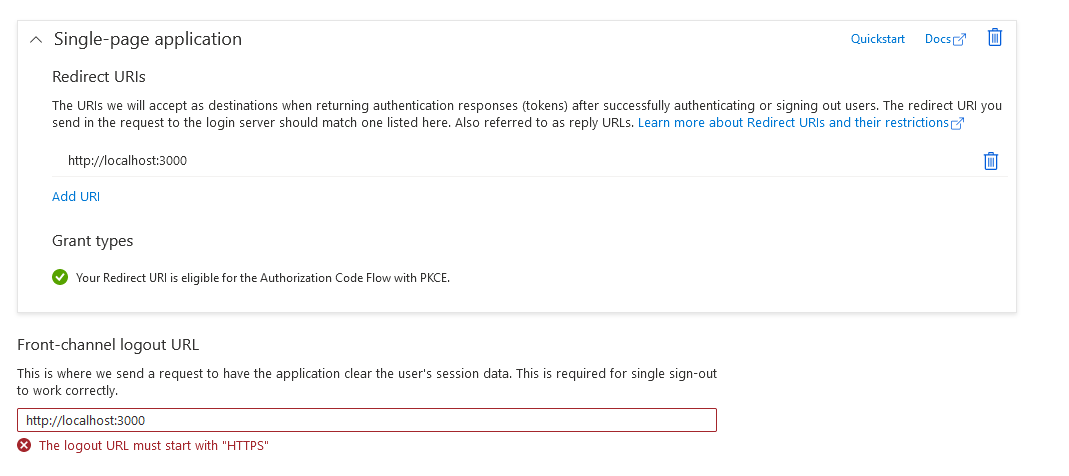
Make sure to expose the api scope

Part 2: .NET Core backend setup
- Create a new .NET Core Web API project.
- Install the
Microsoft.AspNetCore.Authentication.JwtBearerNuGet package. - Configure the authentication middleware to use Azure AD as the authentication provider.
- Add an authorization policy to require authenticated users for protected endpoints.
In the appsettings.json

In program config

Part 3: React app setup
- Install the
react-aad-msalnpm package to handle authentication with Azure AD. - Configure the
react-aad-msalprovider component to use your Azure AD application’s client ID and redirect URI. - Wrap the React app with the
react-aad-msalprovider component. - Use the
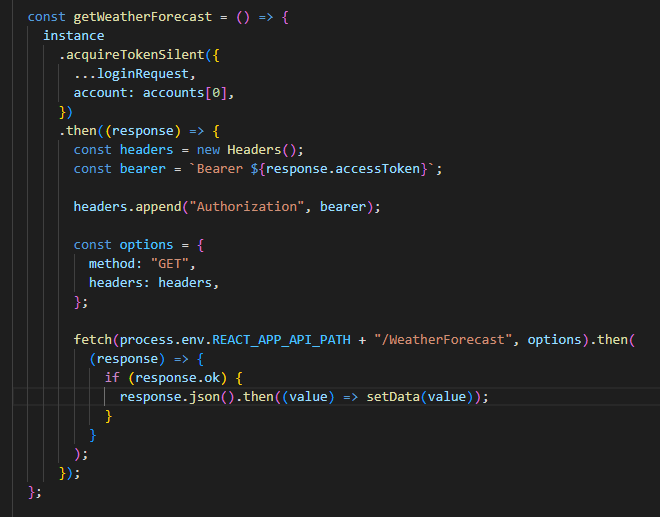
AuthenticationContextobject provided byreact-aad-msalto authenticate the user and acquire and access token. - Send the access token as a bearer token in requests to the .NET Core backend.
The acquireTokenSilent will handle the token refresh.
Conclusion
By following this tutorial, you should now have a React application secured with Azure AD authentication and a .NET Core backend that validates access tokens. With this setup, you can build secure, authenticated applications that utilize Azure AD for identity management.